
AI · Tools · Prompting · Leadership

Better Prompts, Better Answers: Learning to Use ChatGPT Like Training a Yak

By Dr. ND Lama · June 27, 2026

Training a yak to carry a balanced load — an analogy for guiding AI tools well
Like training a yak: good tools need good guidance

When I was young, I was a yak herder. We moved from one place to another in the mountains. Carrying everything by ourselves was not wise, so I learned how to use the strength of the yaks.

At first, it was not easy. I made small sacks and placed different items on the animals. Sometimes the load was not balanced. Sometimes the rope tangled in trees. Sometimes things were lost on the way. I had to watch carefully, improve the carrier, adjust the load, and learn how each yak behaved.

Over time, I developed better methods. The loads became safer. Fewer things were lost. The journey became easier because I was no longer carrying everything myself. I had learned how to use the energy of the yak properly.

But training a yak was not only about giving commands. During the training process, the yak also began to understand my language, and I also began to understand the style of the yak. Different yaks worked differently. Some walked fast, some slowly. Some carried heavier loads, while others needed lighter loads. Some responded to a firm command, while others needed a calmer approach.

So I could not command every yak in exactly the same way. I had to learn their nature, their rhythm, and their behavior. Then I could guide each one more accurately.

Using ChatGPT is similar.

The computer will not automatically do good work just because we open it. Like a yak, it needs direction. Like a worker, it needs clear instruction. Like a student, it needs examples and correction. If we give unclear instructions, we may get poor results. If we give clear instructions, useful context, and a specific goal, ChatGPT can begin to work for us.

At the same time, we also begin to understand how ChatGPT works. We learn what kind of instruction produces a better answer. We learn how to give context. We learn how to correct the answer. We learn how to ask again in a better way. In this process, we are not only training the tool; we are also training ourselves to become better guides.

This is also similar to human resources. When we work with people, we do not simply shout orders. We explain the task, the purpose, the expected result, the deadline, and the standard. We use the right words and the right tone. We motivate, train, correct, and improve the system. Then people begin to work effectively.

ChatGPT works in a similar way. We need to learn how to “train” it through good prompts. A good prompt gives direction. A better prompt gives context, role, audience, goal, format, tone, and limits.

In the past, I learned how to use the strength of yaks. Later, I learned how to use computers. Today, I am learning how to use AI tools like ChatGPT. The principle is similar: do not carry every load yourself. Learn how to guide the tools, systems, and people God has placed around you.

A trained yak can carry loads across the mountains. A trained worker can carry responsibility in an organization. A well-prompted AI tool can carry part of our thinking, writing, planning, and organizing work.

But in all three cases, the leader must learn how to guide well.

So, how do we guide ChatGPT well? We begin with a clear prompt.

What Is a Good Prompt?

A prompt is the instruction we give to ChatGPT. A weak prompt gives very little direction. A strong prompt gives enough information for ChatGPT to understand what we need.

For example:

Weak prompt: “Make a lesson on mentoring.” This may produce something useful, but it may also be too general, too Western, too academic, too short, too long, or not suitable for your learners.

Stronger prompt: “Act as a church-based training curriculum designer. I am preparing a 90-minute workshop for small-group leaders in Asia. The audience includes pastors and volunteer leaders with different education levels. Create a practical lesson on mentoring using 2 Timothy 2:2. The goal is for each participant to identify one person they can mentor. Use simple English, include oral discussion, one group activity, one reflection question, and one 30-day action step. Keep it under 700 words.”

The second prompt is much better because it gives direction.

Good prompting is not magic. It is clear communication. If we want a better answer, we must learn to give better instructions.

A Simple Formula for Better Prompts

You can remember this formula:

Role + Context + Task + Audience + Goal + Source + Format + Tone + Limits
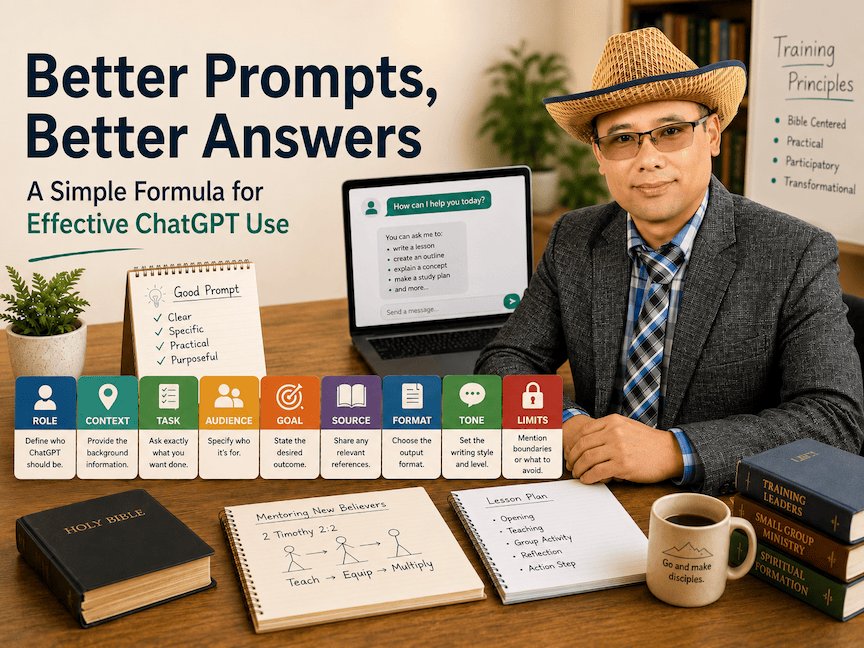
A simple formula for better prompts: Role + Context + Task + Audience + Goal + Source + Format + Tone + Limits
The nine parts of a strong prompt

This formula does not mean every prompt must be very long. It means your prompt should give enough guidance so ChatGPT can produce a useful answer. Let us look at each part.

1. Role

Tell ChatGPT what role to take. Example: “Act as an experienced church-based training course writer.”

Other possible roles include:

  • Bible teacher
  • curriculum designer
  • editor
  • translator
  • mentor
  • training facilitator
  • youth ministry trainer
  • adult learning specialist
  • policy advisor
  • visual resource designer

When you give ChatGPT a role, you are helping it know what kind of thinking to use. A Bible teacher will answer differently from a graphic designer. A curriculum writer will answer differently from a social media editor.

2. Context

Explain the situation clearly. Example: “I am preparing a training session for church leaders in rural Nepal. Many learners prefer oral discussion more than reading long texts.”

Context is like telling the yak where the path is. Without context, ChatGPT may go in the wrong direction. It may give a good answer, but not the right answer for your situation. Useful context may include:

  • Where you are working
  • What kind of learners you have
  • What problem you are trying to solve
  • What language level is needed
  • What cultural setting matters
  • What has already been taught

3. Task

Say exactly what you want ChatGPT to do. Example: “Create a 45-minute lesson plan on mentoring new believers.”

Be clear about the action. Do you want ChatGPT to write, summarize, translate, simplify, compare, create questions, make a lesson plan, design a worksheet, check grammar, or give feedback? A clear task produces a clearer answer.

4. Audience

Describe who the material is for. Example: “The learners are volunteer small-group leaders with limited theological training.”

Audience matters. A lesson for seminary students will not be the same as a lesson for village church leaders. A message for parents will not be the same as a message for teenagers. A teacher training handout will not be the same as a Facebook post. Tell ChatGPT who will read, hear, or use the content.

5. Goal or Outcome

Tell ChatGPT what result you want. Example: “By the end, participants should be able to explain mentoring and choose one person to begin mentoring.”

This is very important for training and education. We should not only ask, “What content should I teach?” We should also ask, “What should people be able to do after this?” Good goals help ChatGPT prepare practical content, not just information.

6. Source Material

Provide the Bible passage, course text, notes, draft, or ideas you want ChatGPT to use. Example: “Use 2 Timothy 2:2 and the notes below.”

This helps protect your message. If you do not provide source material, ChatGPT may create general content. Sometimes that is fine, but for Bible teaching, training, policy, school work, or official communication, it is better to give the source. You can paste:

  • Bible passages
  • course notes
  • meeting notes
  • draft paragraphs
  • government guidelines
  • teacher training materials
  • student answers
  • your own rough ideas

Then ask ChatGPT to work from those materials.

7. Format

Specify the output format. Example: “Give the answer in this format: title, aim, opening question, teaching points, group activity, reflection, action step.”

Format is very helpful. Without format, ChatGPT may give a long essay when you need a table. Or it may give bullet points when you need a speech. You can ask for:

  • a table
  • a lesson plan
  • a sermon outline
  • a Facebook post
  • a handout
  • a checklist
  • a report
  • a letter
  • a question bank
  • a workshop schedule
  • a script for a video

When you know the format, say it clearly.

8. Tone and Level

Tell ChatGPT the writing style. Example: “Use simple English, a warm tone, and practical examples suitable for adult learners.”

Tone matters because words affect people. If you are writing to teachers, the tone should be respectful. If you are writing to parents, the tone should be clear and caring. If you are writing to church leaders, the tone may need to be biblical, humble, and practical. You can say:

  • Use simple English.
  • Use Nepali-friendly English.
  • Use a warm and respectful tone.
  • Use a practical training style.
  • Avoid academic language.
  • Make it suitable for oral learners.
  • Make it encouraging but honest.

9. Limits and Constraints

Tell ChatGPT what to avoid or protect. Example: “Do not use Western examples. Do not make the lesson too academic. Do not invent statistics. Keep the theology evangelical and Bible-centered.”

Limits are not negative. They are like ropes and carriers for the yak. They keep the load safe. Good limits may include:

  • Keep it under 500 words.
  • Use 3 to 5 sentences.
  • Do not invent facts.
  • Do not use complex theological terms.
  • Do not make it too emotional.
  • Avoid political language.
  • Do not use examples that are not suitable for Nepal.
  • Keep the content Bible-centered.
  • Make it suitable for mixed education levels.

10. Ask for Interaction

Sometimes we should ask ChatGPT to clarify before answering. Example: “Ask me up to three questions before preparing the final lesson if anything is unclear.”

This is useful when the task is complex. A good worker asks questions before starting an important assignment. In the same way, ChatGPT can ask helpful questions before producing the final answer. You can write:

  • “Before answering, ask me three clarifying questions.”
  • “First, check if you understand my goal.”
  • “Tell me what information is missing.”
  • “Give me two possible approaches before writing the final version.”

11. Review and Improve

Do not accept the first answer blindly. Review it, correct it, and ask ChatGPT to improve it. Prompting works best as a conversation. You give an instruction, review the answer, then refine it. Useful follow-up prompts include:

  • Make this simpler.
  • Add more interaction.
  • Adapt this for oral learners.
  • Give me a stronger opening activity.
  • Check for theological weakness.
  • Rewrite this for Nepali church leaders.
  • Make it shorter / warmer / more practical.
  • Turn this into a handout.
  • Turn this into discussion questions.
  • Give me a version for teachers / for parents.

This is like adjusting the load on a yak. The first attempt may not be balanced. But with correction, the result becomes better.

Learn the Style of Each AI Tool

Just as different yaks behave differently, different AI tools also work differently.

ChatGPT may be strong in conversation, teaching, editing, planning, and creating structured content. Claude may be very helpful for long writing, website building, and careful organization. Other tools may be better for images, coding, video, or research.

So the wise user does not only ask, “Can AI do this?” The wise user asks:

  • Which tool is best for this task?
  • What kind of prompt works best with this tool?
  • How much context does it need?
  • Does it need examples? Does it need correction?
  • Should I ask for a draft, outline, table, checklist, or final version?

This is like knowing your yaks. You do not treat every yak the same way. You learn how each one works, and then you guide it accordingly. In the same way, good AI use requires observation, practice, correction, and wisdom.

A Full Example Prompt

Here is one complete prompt using the formula:

“Act as a church-based training curriculum designer. I am preparing a 90-minute workshop for small-group leaders in Asia. The audience includes pastors and volunteer leaders with different education levels. Create a practical lesson on mentoring using 2 Timothy 2:2. The goal is for each participant to identify one person they can mentor. Use simple English, include oral discussion, one group activity, one reflection question, and one 30-day action step. Keep it under 700 words. Do not use Western examples. Keep the theology evangelical and Bible-centered.”

This prompt gives ChatGPT a clear role, context, task, audience, goal, source, format, tone, and limits.

Another Example for Teachers

“Act as an experienced primary school teacher trainer. I am preparing a 45-minute training session for Grade 3 teachers in Nepal. The teachers are learning how to use continuous assessment instead of only exam-based assessment. Create a simple training outline with an opening question, three teaching points, one group activity, one sample classroom observation checklist, and one reflection question. Use simple English and practical examples from Nepali classrooms. Keep it under 600 words.”

Another Example for Writing

“Act as a careful editor. I will paste a rough paragraph below. Please improve the grammar, make it clear, keep my meaning, and use a respectful tone. Do not make it too formal. After rewriting, give me three short suggestions to make the message stronger.”

Another Example for Translation

“Act as a Nepali-English translator. Translate the following Nepali paragraph into clear, natural English. Keep the emotional tone, but make the English easy to understand for international readers. Do not add new ideas.”

What ChatGPT Can Help With

When guided well, ChatGPT can help with many tasks:

  • planning lessons
  • writing training outlines
  • editing messages
  • summarizing notes
  • creating discussion questions
  • preparing Bible study guides
  • designing teacher training materials
  • generating parent letters
  • simplifying difficult ideas
  • translating and improving language
  • creating social media drafts
  • brainstorming book chapters
  • preparing workshop activities

But ChatGPT should not replace wisdom, prayer, study, or human responsibility. It is a tool. The leader must still lead.

Important Caution

ChatGPT can make mistakes. It may sometimes sound confident even when it is wrong. Always review facts, names, dates, Bible references, theology, statistics, and official information.

For serious matters, check reliable sources. For Bible teaching, check the Scripture carefully. For school policy, check official documents. For publication, edit before posting.

A trained yak can still wander. A trained worker can still misunderstand. A trained AI tool can still produce errors. So the leader must watch, guide, correct, and take responsibility.

A Practical Note from My Own Experience

This blog post itself is an example of what I am writing about.

The draft was proofread and improved with the help of ChatGPT. The two images used for this post were also created and combined with ChatGPT. That image work took me about eight minutes. If I had tried to do the same thing manually in Photoshop, it could easily have taken me around two hours.

My website was built with the help of Claude. Preparing and publishing this blog post took me about fifteen minutes. If I had used only traditional tools, the same work would normally take much longer.

This does not mean AI did everything for me. I still had to provide the idea, the story, the direction, the correction, and the final judgment. But AI helped me carry part of the load. That is exactly the point of this article.

A trained yak helped me carry physical loads in the mountains. A trained computer helps me carry digital and creative loads today. A well-guided AI tool helps me write, edit, design, organize, and publish faster. The leader still needs wisdom. But the leader does not need to carry every load alone.

Final Thought

The goal of using ChatGPT is not laziness. The goal is stewardship.

When I was young, I learned not to carry every load on my own back. I learned how to use the strength of the yaks wisely. Later, I learned how to use computers. Now, we are learning how to use AI. The principle is the same: good tools require good guidance.

If we learn to give clear instructions, provide helpful context, set the right goals, and review the results carefully, ChatGPT can become a useful assistant for teaching, training, writing, ministry, and leadership.

Better prompts lead to better answers. Better answers can lead to better training. Better training can lead to better service.

Why I Wrote This Article

I wrote this article as part of my preparation for an AI presentation in Malaysia this coming October. I am preparing together with friends from Korea, China, and the UK. The final presentation is still being shaped, but our focus will likely be on how to use AI tools like ChatGPT and Claude effectively, especially for text, images, course writing, translation, adaptation, and responsible use.

I am also thinking of two older friends, Graham and Tim, who have encouraged me and helped me think more deeply about how AI can serve training, writing, translation, and ministry. This article is the first part of what I hope to discuss with my team. At this stage, I am thinking of the training in these parts:

  • Part 1: Using ChatGPT Efficiently — How to write better prompts, give clear context, ask for the right format, and improve answers through follow-up.
  • Part 2: Using AI for Course Writing — How AI can help prepare lessons, outlines, discussion questions, activities, reflection questions, and action steps.
  • Part 3: AI for Translation and Adaptation — How AI can help translate, simplify, contextualize, and adapt training materials for different cultures, languages, and education levels.
  • Part 4: Responsible AI Use — How to use AI wisely, ethically, and carefully without blindly trusting everything it produces.
  • Part 5: AI for Images and Visual Learning — How AI can help create teaching images, blog banners, illustrations, and visual resources for learners who understand better through pictures.
  • Part 6: PDF Compression — How to reduce file sizes so training materials can be shared more easily by email, WhatsApp, websites, or learning platforms.
  • Part 7: File Renaming — How organized file names save time and reduce confusion, especially when many people are working on training materials.
  • Part 8: Folder Organization — How to build a simple folder system so images, PDFs, drafts, final versions, and source files are easy to find.
  • Part 9: Using Claude or ChatGPT for Website Building — How AI can help build simple websites for courses, blogs, questionnaires, resources, and training materials.
  • Part 10: 30-Day Action Plan — How participants can begin using AI step by step after the training, instead of only listening to a presentation.

What excites me most is not that AI can do everything for us. What excites me is that AI can help ordinary trainers, teachers, pastors, writers, and course developers carry work that used to take much longer. If we learn to guide these tools well, we can create, translate, adapt, organize, and publish more effectively for the service of others.

A note for the curious Technically, it is the nak (the female) that gives the milk — the yak (the male) just gets the credit. So every “yak cheese” sign in the city should really read “nak cheese.” A small reminder that even the labels we take for granted deserve a second look — the very habit that makes us better at guiding our tools, and our thinking.
याकलाई सन्तुलित लोड बोक्न तालिम दिनु — AI उपकरणलाई राम्रोसँग मार्गदर्शन गर्ने उपमा
याक तालिम दिनु जस्तै: राम्रो tool लाई राम्रो guidance चाहिन्छ

जब म सानो थिएँ, म याक गोठालो थिएँ। हिमाली क्षेत्रमा हामी एक ठाउँबाट अर्को ठाउँमा सर्दै हिँड्थ्यौँ। सबै सामान आफैँले बोकेर हिँड्नु बुद्धिमानी थिएन। त्यसैले मैले याकको शक्ति कसरी प्रयोग गर्ने भनेर सिक्न थालेँ।

सुरुमा सजिलो थिएन। मैले साना–साना बोरा बनाउँथेँ, सामान मिलाएर राख्थेँ, अनि याकको ढाडमा लोड राख्थेँ। कहिलेकाहीँ लोड सन्तुलित हुँदैनथ्यो। कहिलेकाहीँ डोरी रूखमा अल्झिन्थ्यो। कहिलेकाहीँ बाटोमा सामान हराउँथ्यो। त्यसैले मैले याकलाई नजिकबाट हेर्नुपर्थ्यो, बोरा र बाँध्ने तरिका सुधार्नुपर्थ्यो, अनि कुन याकले कसरी व्यवहार गर्छ भनेर सिक्नुपर्थ्यो।

समय बित्दै जाँदा मैले राम्रो तरिका विकास गरेँ। लोड सुरक्षित हुन थाल्यो। सामान हराउने क्रम घट्यो। यात्रा सजिलो भयो, किनकि मैले सबै भार आफैँ बोकेको थिइनँ। मैले याकको शक्ति सही तरिकाले प्रयोग गर्न सिकेको थिएँ।

तर याक तालिम दिनु भनेको आदेश दिनु मात्र थिएन। तालिमको क्रममा याकले पनि बिस्तारै मेरो भाषा बुझ्न थाल्थ्यो, र म पनि याकको स्वभाव र शैली बुझ्न थाल्थेँ। सबै याक एउटै हुँदैनथे। कुनै याक छिटो हिँड्थ्यो, कुनै ढिलो। कुनैले धेरै लोड सजिलै बोक्थ्यो, कुनैलाई हल्का लोड चाहिन्थ्यो। कुनैलाई कडा आदेश चाहिन्थ्यो, कुनैलाई शान्त र नरम तरिकाले चलाउनुपर्थ्यो।

त्यसैले मैले सबै याकलाई एउटै तरिकाले चलाउन सक्दिनथेँ। प्रत्येक याकको स्वभाव, गति र व्यवहार बुझ्नुपर्थ्यो। त्यसपछि मात्र म प्रत्येक याकलाई अझ ठीकसँग मार्गदर्शन गर्न सक्थेँ।

ChatGPT प्रयोग गर्नु पनि यस्तै हो।

कम्प्युटर खोलेर मात्र राम्रो काम हुँदैन। याकलाई जस्तै यसलाई पनि निर्देशन चाहिन्छ। कामदारलाई जस्तै यसलाई पनि स्पष्ट काम दिनुपर्छ। विद्यार्थीलाई जस्तै यसलाई पनि उदाहरण, सुधार र मार्गदर्शन चाहिन्छ। यदि हामी अस्पष्ट निर्देशन दिन्छौँ भने कमजोर उत्तर आउन सक्छ। तर यदि हामी स्पष्ट निर्देशन, उचित सन्दर्भ र ठोस लक्ष्य दिन्छौँ भने ChatGPT हाम्रो लागि राम्रोसँग काम गर्न थाल्छ।

त्यसैगरी, हामीले पनि ChatGPT कसरी काम गर्छ भनेर बुझ्न थाल्छौँ। कस्तो निर्देशनले राम्रो उत्तर दिन्छ, कति context चाहिन्छ, कसरी सुधार गर्न लगाउने, फेरि कसरी राम्रोसँग सोध्ने भन्ने कुरा हामी सिक्दै जान्छौँ। यस प्रक्रियामा हामीले tool लाई मात्र तालिम दिइरहेका हुँदैनौँ; हामी आफैँ पनि राम्रो guide बन्न तालिम लिइरहेका हुन्छौँ।

यो मानव स्रोत व्यवस्थापनसँग पनि मिल्दोजुल्दो छ। जब हामी मानिसहरूसँग काम गर्छौँ, हामी केवल आदेश मात्र दिँदैनौँ। हामी काम के हो, किन गर्नुपर्छ, कस्तो परिणाम चाहिन्छ, कहिलेसम्म चाहिन्छ, र कस्तो मापदण्ड चाहिन्छ भनेर स्पष्ट पार्छौँ। हामी सही शब्द प्रयोग गर्छौँ, सही शैली प्रयोग गर्छौँ, प्रेरणा दिन्छौँ, तालिम दिन्छौँ, सुधार गर्छौँ, अनि प्रणाली बनाउँछौँ। त्यसपछि मानिसहरूले प्रभावकारी रूपमा काम गर्न थाल्छन्।

ChatGPT पनि त्यस्तै हो। यसलाई राम्रोसँग “तालिम” दिन राम्रो prompt चाहिन्छ। राम्रो prompt ले दिशा दिन्छ। अझ राम्रो prompt ले सन्दर्भ, भूमिका, पाठक, लक्ष्य, ढाँचा, शैली र सीमा स्पष्ट पार्छ।

पहिले मैले याकको शक्ति प्रयोग गर्न सिकेँ। पछि मैले कम्प्युटर प्रयोग गर्न सिकेँ। आज म ChatGPT जस्ता AI उपकरणहरू प्रयोग गर्न सिक्दैछु। सिद्धान्त उही हो: सबै भार आफैँ नबोक्नुहोस्। परमेश्वरले हाम्रो वरिपरि दिनुभएका उपकरण, प्रणाली र मानिसहरूलाई बुद्धिमानीपूर्वक मार्गदर्शन गर्न सिक्नुहोस्।

तालिम पाएको याकले हिमालको बाटोमा भारी बोक्न सक्छ। तालिम पाएको कामदारले संस्थाको जिम्मेवारी बोक्न सक्छ। राम्रो prompt पाएको AI उपकरणले हाम्रो सोच, लेखन, योजना र व्यवस्थापनको केही भार बोक्न सक्छ।

तर यी तीनै अवस्थामा नेतृत्व गर्ने व्यक्तिले राम्रोसँग मार्गदर्शन गर्न जान्नुपर्छ। त्यसो भए ChatGPT लाई कसरी राम्रोसँग मार्गदर्शन गर्ने? यसको सुरुवात राम्रो prompt बाट हुन्छ।

राम्रो Prompt भनेको के हो?

Prompt भनेको हामीले ChatGPT लाई दिने निर्देशन हो। कमजोर prompt ले थोरै मात्र दिशा दिन्छ। बलियो prompt ले ChatGPT लाई हामीलाई के चाहिएको हो भनेर बुझ्न पर्याप्त जानकारी दिन्छ। उदाहरणका लागि:

कमजोर prompt: “Mentoring बारे एउटा lesson बनाइदेऊ।” यो prompt बाट केही उपयोगी कुरा आउन सक्छ, तर उत्तर धेरै सामान्य, धेरै पश्चिमी, धेरै शैक्षिक, धेरै छोटो वा धेरै लामो हुन सक्छ। तपाईंका विद्यार्थी वा सहभागीहरूका लागि उपयुक्त नहुन सक्छ।

बलियो prompt: “तिमी church-based training curriculum designer को भूमिकामा काम गर। म एशियाका small-group leaders का लागि ९० मिनेटको workshop तयार गर्दैछु। सहभागीहरूमा pastor र volunteer leaders छन्, र उनीहरूको शिक्षा स्तर फरक–फरक छ। २ तिमोथी २:२ प्रयोग गरेर mentoring सम्बन्धी व्यावहारिक lesson तयार गर। लक्ष्य यो हो कि हरेक सहभागीले आफूले mentoring गर्न सक्ने एकजना व्यक्ति पहिचान गरून्। सरल English प्रयोग गर। Oral discussion, एउटा group activity, एउटा reflection question, र ३० दिने action step समावेश गर। ७०० शब्दभन्दा कम राख।”

दोस्रो prompt राम्रो छ, किनकि यसले ChatGPT लाई स्पष्ट दिशा दिन्छ। राम्रो prompting कुनै जादु होइन। यो स्पष्ट communication हो। हामीलाई राम्रो उत्तर चाहिन्छ भने, हामीले राम्रो निर्देशन दिन सिक्नुपर्छ।

राम्रो Prompt का लागि सरल सूत्र

यो सूत्र सम्झन सजिलो छ:

Role + Context + Task + Audience + Goal + Source + Format + Tone + Limits
राम्रो prompt का लागि सरल सूत्र: Role + Context + Task + Audience + Goal + Source + Format + Tone + Limits
बलियो prompt का नौ भाग

यसको अर्थ हरेक prompt धेरै लामो हुनुपर्छ भन्ने होइन। यसको अर्थ prompt ले ChatGPT लाई उपयोगी उत्तर दिन पुग्ने स्पष्ट मार्गदर्शन दिनुपर्छ भन्ने हो। अब यी प्रत्येक भाग हेरौँ।

१. Role — भूमिका

ChatGPT लाई कुन भूमिकामा काम गर्न लगाउने हो, त्यो बताउनुहोस्। उदाहरण: “एक अनुभवी church-based training course writer को रूपमा काम गर।” सम्भावित भूमिकाहरू:

  • Bible teacher
  • curriculum designer
  • editor
  • translator
  • mentor
  • training facilitator
  • youth ministry trainer
  • adult learning specialist
  • policy advisor
  • visual resource designer

जब तपाईं ChatGPT लाई भूमिका दिनुहुन्छ, तपाईंले त्यसलाई कुन प्रकारको सोच प्रयोग गर्ने भनेर संकेत दिनुहुन्छ। Bible teacher ले दिने उत्तर graphic designer ले दिने उत्तरभन्दा फरक हुन्छ। Curriculum writer ले दिने उत्तर social media editor ले दिने उत्तरभन्दा फरक हुन्छ।

२. Context — सन्दर्भ

स्थिति स्पष्ट रूपमा बताउनुहोस्। उदाहरण: “म ग्रामीण नेपालका church leaders का लागि training session तयार गर्दैछु। धेरै learner हरू लामो लेख पढ्नुभन्दा oral discussion मन पराउँछन्।”

Context भनेको याकलाई बाटो देखाउनु जस्तै हो। Context बिना ChatGPT गलत दिशामा जान सक्छ। उत्तर राम्रो देखिए पनि तपाईंको अवस्थाका लागि उपयुक्त नहुन सक्छ। सन्दर्भमा यस्ता कुरा आउन सक्छन्:

  • तपाईं कहाँ काम गर्दै हुनुहुन्छ
  • तपाईंका learner कस्ता छन्
  • तपाईं कुन समस्या समाधान गर्न खोज्दै हुनुहुन्छ
  • कुन language level चाहिन्छ
  • कुन cultural setting महत्त्वपूर्ण छ
  • पहिले के सिकाइसकिएको छ

३. Task — काम

ChatGPT लाई के गर्न लगाउने हो, ठीकसँग भन्नुहोस्। उदाहरण: “नयाँ विश्वासीहरूलाई mentoring गर्ने विषयमा ४५ मिनेटको lesson plan बनाऊ।”

काम स्पष्ट हुनुपर्छ। तपाईंलाई लेख्न लगाउने हो? सारांश चाहिएको हो? अनुवाद चाहिएको हो? सरल बनाउनुपर्ने हो? तुलना गर्नुपर्ने हो? प्रश्न बनाउनुपर्ने हो? Lesson plan चाहिएको हो? Worksheet चाहिएको हो? Grammar check चाहिएको हो? काम स्पष्ट भयो भने उत्तर पनि स्पष्ट हुन्छ।

४. Audience — लक्षित समूह

सामग्री कसका लागि हो भनेर बताउनुहोस्। उदाहरण: “Learners हरू सीमित theological training भएका volunteer small-group leaders हुन्।”

Audience महत्त्वपूर्ण छ। Seminary students का लागि तयार गरिएको lesson गाउँका church leaders का लागि उपयुक्त नहुन सक्छ। अभिभावकलाई लेखिएको सूचना teenage students लाई लेखिएको जस्तो हुँदैन। Teacher training handout र Facebook post एउटै शैलीमा लेखिँदैन। कसले पढ्ने, कसले सुन्ने, वा कसले प्रयोग गर्ने हो, ChatGPT लाई बताउनुहोस्।

५. Goal — लक्ष्य वा परिणाम

तपाईंले अन्त्यमा कस्तो परिणाम चाहनुभएको हो, बताउनुहोस्। उदाहरण: “Session सकिँदा सहभागीहरूले mentoring के हो भनेर बुझून् र आफूले mentoring गर्न सक्ने एकजना व्यक्ति छानून्।”

Training र education मा यो धेरै महत्त्वपूर्ण छ। हामीले “के पढाउने?” मात्र होइन, “सिकेपछि मानिसले के गर्न सक्ने?” भनेर पनि सोच्नुपर्छ। राम्रो goal ले ChatGPT लाई केवल सूचना होइन, व्यावहारिक सामग्री तयार गर्न मद्दत गर्छ।

६. Source Material — स्रोत सामग्री

तपाईंले प्रयोग गर्न चाहेको Bible passage, course text, notes, draft वा idea दिनुहोस्। उदाहरण: “२ तिमोथी २:२ र तलका notes प्रयोग गर।”

यसले तपाईंको सन्देश सुरक्षित राख्न मद्दत गर्छ। यदि तपाईंले source material दिनुभएन भने ChatGPT ले सामान्य सामग्री बनाइदिन सक्छ। कहिलेकाहीँ त्यो ठीक हुन्छ। तर Bible teaching, training, policy, school work वा official communication का लागि स्रोत सामग्री दिनु राम्रो हुन्छ। तपाईं यस्ता सामग्री paste गर्न सक्नुहुन्छ:

  • Bible passage
  • course notes
  • meeting notes
  • rough draft
  • government guideline
  • teacher training materials
  • student answers
  • आफ्ना प्रारम्भिक विचारहरू

त्यसपछि ChatGPT लाई ती सामग्रीका आधारमा काम गर्न भन्नुहोस्।

७. Format — ढाँचा

उत्तर कुन ढाँचामा चाहिएको हो, स्पष्ट बताउनुहोस्। उदाहरण: “उत्तर यो format मा देऊ: title, aim, opening question, teaching points, group activity, reflection, action step।”

Format धेरै उपयोगी हुन्छ। तपाईंलाई table चाहिएको हुन सक्छ, तर ChatGPT ले essay दिन सक्छ। तपाईंलाई bullet points चाहिएको हुन सक्छ, तर यसले लामो लेख दिन सक्छ। तपाईं यसरी भन्न सक्नुहुन्छ:

  • table मा देऊ
  • lesson plan बनाऊ
  • sermon outline बनाऊ
  • Facebook post बनाऊ
  • handout बनाऊ
  • checklist बनाऊ
  • report बनाऊ
  • letter बनाऊ
  • question bank बनाऊ
  • workshop schedule बनाऊ
  • video script बनाऊ

ढाँचा थाहा छ भने स्पष्ट भन्नुहोस्।

८. Tone and Level — शैली र स्तर

लेखन शैली बताउनुहोस्। उदाहरण: “सरल English प्रयोग गर, warm tone राख, र adult learners का लागि practical examples देऊ।”

Tone महत्त्वपूर्ण छ, किनकि शब्दहरूले मानिसलाई असर गर्छन्। Teachers लाई लेख्दा respectful tone चाहिन्छ। Parents लाई लेख्दा clear and caring tone चाहिन्छ। Church leaders लाई लेख्दा biblical, humble र practical tone चाहिन सक्छ। तपाईं यसरी भन्न सक्नुहुन्छ:

  • सरल English प्रयोग गर।
  • Nepali-friendly English प्रयोग गर।
  • Warm and respectful tone राख।
  • Practical training style प्रयोग गर।
  • Academic language धेरै प्रयोग नगर।
  • Oral learners का लागि उपयुक्त बनाऊ।
  • Encouraging तर honest बनाऊ।

९. Limits and Constraints — सीमा र सावधानी

के गर्न नहुने हो, के कुराबाट जोगिनुपर्ने हो, त्यो पनि बताउनुहोस्। उदाहरण: “Western examples प्रयोग नगर। Lesson धेरै academic नबनाऊ। तथ्याङ्क आफैँ नबनाऊ। Theology evangelical र Bible-centered राख।”

Limits नकारात्मक कुरा होइनन्। यो याकलाई सुरक्षित रूपमा लोड बाँध्ने डोरी जस्तै हो। सीमाले सामग्रीलाई सुरक्षित राख्छ। राम्रो limits यस्ता हुन सक्छन्:

  • ५०० शब्दभन्दा कम राख।
  • ३ देखि ५ वाक्यमा देऊ।
  • तथ्य आफैँ नबनाऊ।
  • जटिल theological शब्द प्रयोग नगर।
  • धेरै भावनात्मक नबनाऊ।
  • राजनीतिक भाषा प्रयोग नगर।
  • नेपालका लागि अनुपयुक्त उदाहरण नदेऊ।
  • Bible-centered राख।
  • फरक शिक्षा स्तर भएका मानिसहरूका लागि उपयुक्त बनाऊ।

१०. Ask for Interaction — आवश्यक परे प्रश्न सोध्न लगाउनुहोस्

कहिलेकाहीँ ChatGPT लाई उत्तर दिनुभन्दा पहिले स्पष्ट पार्ने प्रश्न सोध्न लगाउनु राम्रो हुन्छ। उदाहरण: “केही अस्पष्ट भए final lesson बनाउनु अघि मलाई बढीमा तीनवटा प्रश्न सोध।”

Complex task हुँदा यो धेरै उपयोगी हुन्छ। राम्रो कामदारले महत्त्वपूर्ण काम सुरु गर्नुअघि प्रश्न सोध्छ। त्यसैगरी ChatGPT ले पनि अन्तिम उत्तर दिनुअघि उपयोगी प्रश्न सोध्न सक्छ। तपाईं यसरी लेख्न सक्नुहुन्छ:

  • “उत्तर दिनुअघि मलाई तीनवटा clarifying questions सोध।”
  • “पहिले मेरो goal बुझ्यौ कि बुझेनौ जाँच गर।”
  • “कुन information missing छ, बताऊ।”
  • “Final version लेख्नुअघि दुईवटा possible approach देऊ।”

११. Review and Improve — जाँच गर्नुहोस् र सुधार्नुहोस्

पहिलो उत्तर नै अन्तिम उत्तर हो भनेर स्वीकार नगर्नुहोस्। पढ्नुहोस्, जाँच गर्नुहोस्, सुधार्नुहोस्, अनि ChatGPT लाई फेरि सुधार्न लगाउनुहोस्। Prompting भनेको एकचोटिको आदेश मात्र होइन। यो संवाद हो। तपाईं निर्देशन दिनुहुन्छ, उत्तर हेर्नुहुन्छ, त्यसपछि फेरि refine गर्नुहुन्छ। उपयोगी follow-up prompts:

  • यो अझ सरल बनाऊ।
  • यसमा interaction थप।
  • Oral learners का लागि मिलाऊ।
  • Opening activity अझ बलियो बनाऊ।
  • Theological weakness छ कि जाँच गर।
  • Nepali church leaders का लागि rewrite गर।
  • छोटो / warm / अझ practical बनाऊ।
  • यसलाई handout बनाऊ।
  • यसलाई discussion questions मा बदल।
  • Teachers / Parents का लागि version देऊ।

यो याकको लोड मिलाउनु जस्तै हो। पहिलो प्रयासमा लोड सन्तुलित नहुन सक्छ। तर सुधार गर्दै लगेपछि परिणाम राम्रो हुन्छ।

हरेक AI Tool को शैली बुझ्नुहोस्

जसरी हरेक याकको स्वभाव फरक हुन्छ, त्यसरी नै हरेक AI tool को काम गर्ने शैली पनि फरक हुन्छ।

ChatGPT conversation, teaching, editing, planning र structured content बनाउन धेरै उपयोगी हुन सक्छ। Claude लामो लेखन, website building र careful organization मा उपयोगी हुन सक्छ। अरू tools image, coding, video वा research का लागि अझ राम्रो हुन सक्छन्। त्यसैले बुद्धिमानी user ले केवल “AI ले यो गर्न सक्छ?” भनेर मात्र सोध्दैन। बुद्धिमानी user ले यस्ता प्रश्न पनि सोध्छ:

  • यो कामका लागि कुन tool राम्रो हुन्छ?
  • यो tool सँग कस्तो prompt राम्रो काम गर्छ?
  • यसलाई कति context चाहिन्छ?
  • यसलाई examples चाहिन्छ कि चाहिँदैन? Correction चाहिन्छ?
  • मैले draft, outline, table, checklist वा final version कुन माग्ने?

यो आफ्ना याकहरू चिन्नु जस्तै हो। तपाईंले सबै याकलाई एउटै तरिकाले व्यवहार गर्नुहुन्न। कुन याकले कसरी काम गर्छ भनेर बुझ्नुहुन्छ, अनि त्यसअनुसार मार्गदर्शन गर्नुहुन्छ। त्यसैगरी राम्रो AI प्रयोगका लागि observation, practice, correction र wisdom चाहिन्छ।

पूरा Example Prompt

यहाँ माथिको formula प्रयोग गरेर बनाइएको पूरा prompt छ:

“तिमी church-based training curriculum designer को रूपमा काम गर। म एशियाका small-group leaders का लागि ९० मिनेटको workshop तयार गर्दैछु। Audience मा pastors र volunteer leaders छन्, र उनीहरूको education level फरक–फरक छ। २ तिमोथी २:२ प्रयोग गरेर mentoring सम्बन्धी practical lesson तयार गर। Goal यो हो कि प्रत्येक participant ले आफूले mentoring गर्न सक्ने एकजना व्यक्ति पहिचान गरोस्। Simple English प्रयोग गर। Oral discussion, एउटा group activity, एउटा reflection question, र एउटा 30-day action step समावेश गर। ७०० शब्दभन्दा कम राख। Western examples प्रयोग नगर। Theology evangelical र Bible-centered राख।”

यस prompt ले ChatGPT लाई role, context, task, audience, goal, source, format, tone र limits सबै दिन्छ।

Teachers का लागि अर्को Example

“तिमी experienced primary school teacher trainer को रूपमा काम गर। म नेपालका Grade 3 teachers का लागि ४५ मिनेटको training session तयार गर्दैछु। Teachers हरू केवल exam-based assessment भन्दा continuous assessment कसरी प्रयोग गर्ने भनेर सिक्दैछन्। Opening question, तीनवटा teaching points, एउटा group activity, एउटा sample classroom observation checklist, र एउटा reflection question सहित simple training outline बनाऊ। Simple English प्रयोग गर र Nepali classroom का practical examples देऊ। ६०० शब्दभन्दा कम राख।”

Writing का लागि अर्को Example

“तिमी careful editor को रूपमा काम गर। म तल rough paragraph paste गर्छु। Grammar सुधार, meaning सुरक्षित राख, message clear बनाऊ, र respectful tone प्रयोग गर। धेरै formal नबनाऊ। Rewrite गरेपछि message अझ बलियो बनाउन तीनवटा छोटा सुझाव देऊ।”

Translation का लागि अर्को Example

“तिमी Nepali-English translator को रूपमा काम गर। तलको Nepali paragraph लाई clear, natural English मा translate गर। Emotional tone सुरक्षित राख, तर international readers का लागि English सजिलो बनाऊ। नयाँ idea नथप।”

ChatGPT ले के–के कुरामा सहयोग गर्न सक्छ?

सही तरिकाले मार्गदर्शन गरियो भने ChatGPT ले धेरै काममा सहयोग गर्न सक्छ:

  • lesson planning
  • training outline
  • message editing
  • notes summarizing
  • discussion questions
  • Bible study guide
  • teacher training materials
  • parent letters
  • difficult ideas सरल बनाउने
  • translation and language improvement
  • social media draft
  • book chapter brainstorming
  • workshop activities

तर ChatGPT ले wisdom, prayer, study वा human responsibility लाई बदल्नु हुँदैन। यो एउटा tool हो। नेतृत्व गर्ने व्यक्तिले अझै पनि नेतृत्व गर्नुपर्छ।

महत्त्वपूर्ण सावधानी

ChatGPT ले गल्ती गर्न सक्छ। कहिलेकाहीँ यो गलत कुरा पनि आत्मविश्वासका साथ लेख्न सक्छ। त्यसैले facts, names, dates, Bible references, theology, statistics र official information सधैँ जाँच गर्नुहोस्।

Serious विषयमा reliable sources जाँच गर्नुहोस्। Bible teaching का लागि Scripture ध्यानपूर्वक हेर्नुहोस्। School policy का लागि official documents हेर्नुहोस्। Publication का लागि post गर्नु अघि edit गर्नुहोस्।

तालिम पाएको याक पनि कहिलेकाहीँ बाटो बिराउन सक्छ। तालिम पाएको कामदारले पनि कहिलेकाहीँ गलत बुझ्न सक्छ। तालिम पाएको AI tool ले पनि गल्ती गर्न सक्छ। त्यसैले leader ले हेर्नुपर्छ, मार्गदर्शन गर्नुपर्छ, सुधार गर्नुपर्छ, र जिम्मेवारी लिनुपर्छ।

मेरो आफ्नै अनुभवबाट एउटा व्यावहारिक टिप्पणी

यो blog post आफैँ पनि मैले यहाँ लेखिरहेको कुराको उदाहरण हो।

यो लेखको draft ChatGPT को सहयोगमा proofread र सुधार गरिएको हो। यस post का लागि प्रयोग गरिएका दुईवटा images पनि ChatGPT को सहयोगमा create र combine गरिएका हुन्। त्यो image work गर्न मलाई करिब ८ मिनेट लाग्यो। यदि मैले यही काम Photoshop मा manually गर्नुपरेको भए, सजिलै २ घण्टा लाग्न सक्थ्यो।

मेरो website Claude को सहयोगमा बनाइएको हो। यो blog post तयार गर्न र publish गर्न मलाई करिब १५ मिनेट लाग्यो। यदि मैले traditional tools मात्र प्रयोग गरेको भए, यही काम गर्न सामान्यतया अझ धेरै समय लाग्थ्यो।

यसको अर्थ AI ले सबै काम मेरो सट्टामा गर्‍यो भन्ने होइन। विचार, कथा, दिशा, सुधार र अन्तिम निर्णय अझै पनि मैले नै दिनुपर्‍यो। तर AI ले मलाई केही भार बोक्न सहयोग गर्‍यो। यही नै यस लेखको मुख्य कुरा हो।

तालिम पाएको याकले मलाई हिमालमा physical load बोक्न सहयोग गर्‍यो। तालिम पाएको computer ले आज मलाई digital र creative load बोक्न सहयोग गर्छ। राम्रोसँग मार्गदर्शन गरिएको AI tool ले मलाई लेख्न, edit गर्न, design गर्न, organize गर्न र छिटो publish गर्न सहयोग गर्छ। नेतालाई अझै पनि wisdom चाहिन्छ। तर नेताले सबै भार एक्लै बोक्नुपर्दैन।

अन्तिम विचार

ChatGPT प्रयोग गर्नुको लक्ष्य अल्छी बन्नु होइन। यसको लक्ष्य stewardship हो।

जब म सानो थिएँ, मैले सबै भारी आफ्नै ढाडमा बोक्नु हुँदैन भनेर सिकेँ। मैले याकको शक्ति बुद्धिमानीपूर्वक प्रयोग गर्न सिकेँ। पछि मैले computer प्रयोग गर्न सिकेँ। अहिले हामी AI प्रयोग गर्न सिक्दैछौँ। सिद्धान्त उही हो: राम्रो tool लाई राम्रो guidance चाहिन्छ।

यदि हामीले स्पष्ट निर्देशन दिन, उपयोगी context दिन, सही goal राख्न, र उत्तर ध्यानपूर्वक review गर्न सिक्यौँ भने ChatGPT teaching, training, writing, ministry र leadership का लागि उपयोगी assistant बन्न सक्छ।

राम्रो prompt ले राम्रो उत्तर ल्याउँछ। राम्रो उत्तरले राम्रो training बनाउन सक्छ। राम्रो training ले राम्रो सेवा जन्माउन सक्छ।

मैले यो लेख किन लेखेँ?

मैले यो लेख आउँदो अक्टोबरमा मलेसियामा हुने AI presentation को तयारीको रूपमा लेखेको हुँ। म Korea, China र UK बाट आउनुहुने साथीहरूसँग मिलेर presentation गर्ने तयारीमा छु। हाम्रो presentation अझै अन्तिम रूपमा तयार भइसकेको छैन, तर मुख्य ध्यान ChatGPT र Claude जस्ता AI tools लाई कसरी प्रभावकारी रूपमा प्रयोग गर्ने भन्ने विषयमा हुनेछ। विशेष गरी text, image, course writing, translation, adaptation, र responsible use मा हाम्रो ध्यान जानेछ।

यो लेख लेख्दा म मेरा दुई जना आदरणीय older friends Graham र Tim लाई पनि सम्झिरहेको छु। उहाँहरूले मलाई AI ले training, writing, translation, र ministry मा कसरी सेवा गर्न सक्छ भन्ने विषयमा गहिरो सोच्न प्रेरणा दिनुभएको छ। यो लेख मैले मेरो team सँग छलफल गर्न चाहेको पहिलो भाग हो। अहिले म training लाई यी भागहरूमा सोचिरहेको छु:

  • Part 1: Using ChatGPT Efficiently — राम्रो prompt कसरी लेख्ने, स्पष्ट context कसरी दिने, सही format कसरी माग्ने, र follow-up गरेर उत्तर कसरी सुधार्ने।
  • Part 2: Using AI for Course Writing — AI ले lesson, outline, discussion questions, activities, reflection questions, र action steps तयार गर्न कसरी सहयोग गर्न सक्छ।
  • Part 3: AI for Translation and Adaptation — AI ले training materials लाई फरक भाषा, संस्कृति, र शिक्षा स्तरअनुसार translate, simplify, contextualize, र adapt गर्न कसरी सहयोग गर्न सक्छ।
  • Part 4: Responsible AI Use — AI ले लेखेको सबै कुरा अन्धाधुन्ध विश्वास नगरी बुद्धिमानी, नैतिक, र जिम्मेवार रूपमा कसरी प्रयोग गर्ने।
  • Part 5: AI for Images and Visual Learning — तस्वीरबाट राम्रो सिक्ने learners का लागि teaching images, blog banners, illustrations, र visual resources बनाउन AI कसरी प्रयोग गर्ने।
  • Part 6: PDF Compression — Training materials लाई email, WhatsApp, website, वा learning platform बाट सजिलै share गर्न file size कसरी घटाउने।
  • Part 7: File Renaming — धेरै मानिसहरूले training materials मा काम गर्दा confusion घटाउन र समय बचाउन files लाई कसरी व्यवस्थित नाम दिने।
  • Part 8: Folder Organization — Images, PDFs, drafts, final versions, र source files सजिलै भेटिने गरी simple folder system कसरी बनाउने।
  • Part 9: Using Claude or ChatGPT for Website Building — Courses, blogs, questionnaires, resources, र training materials का लागि simple websites बनाउन AI कसरी प्रयोग गर्ने।
  • Part 10: 30-Day Action Plan — Training सुनेर मात्र नछोडी सहभागीहरूले ३० दिनसम्म step by step AI प्रयोग गर्न कसरी सुरु गर्ने।

मलाई सबैभन्दा उत्साहित बनाउने कुरा AI ले हाम्रो सट्टामा सबै काम गर्छ भन्ने होइन। मलाई उत्साहित बनाउने कुरा यो हो कि AI ले ordinary trainers, teachers, pastors, writers, र course developers लाई पहिले धेरै समय लाग्ने काम छिटो र व्यवस्थित रूपमा गर्न सहयोग गर्न सक्छ। यदि हामीले यी tools लाई राम्रोसँग मार्गदर्शन गर्न सिक्यौँ भने, हामी अझ प्रभावकारी रूपमा create, translate, adapt, organize, र publish गर्न सक्छौँ—अरूहरूको सेवाका लागि।

जिज्ञासुहरूका लागि एउटा कुरा वास्तवमा दूध दिने त नाक (पोथी) हो — याक (भाले) ले भने श्रेय मात्र पाउँछ। त्यसैले सहरमा देखिने हरेक “याक चिज” को साइनबोर्डमा साँच्चै “नाक चिज” लेखिनुपर्ने हो। हामीले सामान्य ठानेका labels पनि एकपटक फेरि जाँच्न योग्य हुन्छन् — यही बानीले हामीलाई आफ्ना tools र आफ्नै सोच राम्रोसँग चलाउन सिकाउँछ।